Your Ryobi generator abruptly stops while powering essential tools during a home renovation, leaving you stranded with half-finished work. This sudden shutdown happens to thousands of users each year when overload conditions trigger automatic safety features. Knowing exactly how to reset Ryobi generator models properly gets you back to work in minutes instead of hours—without causing further damage to your equipment.
Most Ryobi generators feature multiple reset methods depending on why they shut down, but confusing these procedures leads to repeated failures. This guide reveals the precise reset sequences for every common shutdown scenario, from simple overload recovery to persistent electronic faults. You’ll learn which reset method applies to your specific model and problem, how to prevent future shutdowns, and when professional service becomes necessary.
Immediate Response to Unexpected Generator Shutdown
When your Ryobi generator cuts power unexpectedly, your first 30 seconds determine whether you cause additional damage or restore power smoothly. Most users make critical mistakes by immediately trying to restart without addressing the underlying cause.
Critical first actions:
– Turn off all connected devices at the source before attempting reset
– Move generator to open area if operating in enclosed space
– Check for visible warning lights or digital error codes
– Wait 2 minutes if engine appears overheated before proceeding
What to avoid during emergency shutdown:
– Never restart while under load
– Don’t ignore oil warning lights
– Avoid repeated start attempts within 30-second intervals
– Never bypass safety features to force operation
Standard Reset for Overload Shutdowns (RYi & RG Series)
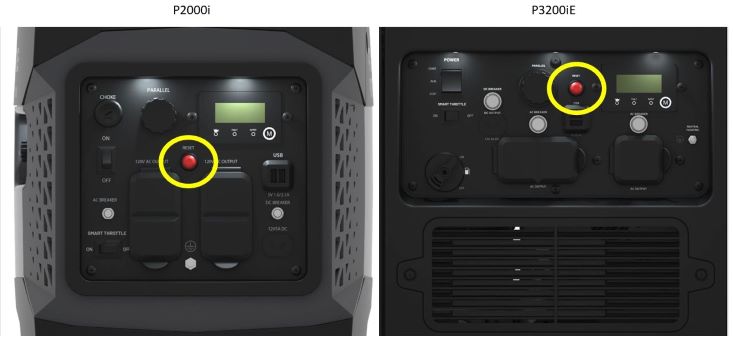
Step-by-Step Overload Recovery Process
Overload shutdowns account for 70% of Ryobi generator resets, triggered when connected devices exceed 80% of the generator’s rated capacity. Following the correct sequence prevents damage to sensitive electronics.
Proper reset procedure:
1. Disconnect all loads – Unplug every device immediately
2. Run unloaded – Let engine idle for 2-3 minutes to stabilize temperature
3. Power down – Switch main power to OFF position
4. Wait 30 seconds – Allows electronic control module to fully reset
5. Restart normally – Follow standard starting sequence for your model
6. Reconnect gradually – Add devices one at a time, starting with largest load
Time required: 5 minutes from shutdown to full operation
Success rate: 95% when performed correctly
Preventing Recurring Overload Shutdowns
Load management techniques that work:
– Use a Kill-A-Watt meter to measure actual device wattage
– Account for startup surge (motors need 2-3x running watts)
– Never exceed 80% of generator’s rated capacity
– Stagger device startup by 30 seconds between items
Common overload mistakes:
– Running space heater (1500W) with power tools (1200W) on 2200W generator
– Forgetting vacuum cleaner motors require 2.5x running watts at startup
– Using undersized extension cords that create artificial overload
Circuit Breaker Reset for Tripped Protection

Locating and Resetting Breakers by Model
Ryobi generators incorporate circuit breakers differently across models, and improper reset techniques cause repeated tripping.
Breaker locations:
– RYi series – Below main control panel (small white button)
– RG series – Integrated into outlet covers (red reset button)
– Digital models – Next to display screen (requires firm press)
Proper Breaker Reset Technique
Single breaker models:
1. Press reset button firmly until you hear a distinct click
2. If button doesn’t stay depressed, investigate underlying issue
3. Test with minimal load before adding full capacity
Critical warning signs:
– Breaker trips again within 60 seconds of resetting
– Visible scorch marks around outlets
– Burning smell during operation
– Voltage fluctuations under light load
Oil Alert System Shutdown Recovery
Low Oil Reset Sequence
When your Ryobi generator stops due to low oil, immediate reset attempts without addressing oil levels cause permanent engine damage. The oil alert system prevents catastrophic failure but requires specific actions.
Correct reset process:
1. Turn off generator and wait 5 minutes for oil to settle
2. Check level using dipstick (wipe, reinsert fully, remove)
3. Add appropriate oil (SAE 10W-30 for most conditions)
4. Fill to full mark without overfilling
5. Restart normally – system resets automatically with proper oil level
Oil capacity by model:
– RYi series: 0.6 quarts
– RG-6900K: 1.1 quarts
– Digital inverter models: 0.8 quarts
Pro tip: Always carry a spare quart of oil matching your generator’s specifications. Running low oil even once can warp engine components.
Model-Specific Reset Procedures That Actually Work

RYi2200 Digital Inverter Reset
Digital models require precise reset techniques for persistent error codes that standard restarts won’t clear.
Hard reset for E01-E04 codes:
1. Note error code displayed (E01=overload, E02=low oil, etc.)
2. Disconnect black battery terminal for 30 seconds
3. Reconnect firmly (listen for system beep)
4. Restart using electric start button
5. Verify display shows normal readings
When standard reset fails:
– E04 codes indicate voltage regulator issues requiring professional service
– Repeated E01 errors suggest faulty load sensing circuit
– Never ignore E02 warnings – continued operation destroys engine
RG-6900K Frame Series Fuel Reset
This heavy-duty model requires specific fuel system manipulation during reset sequences.
Manual reset process:
1. Turn fuel valve to OFF position
2. Let engine burn remaining fuel (30-60 seconds)
3. Engine will sputter and stop naturally
4. Turn fuel valve back to ON
5. Restart normally – use choke if needed
Critical maintenance step: Always inspect air filter during reset procedure – clogged filters cause 40% of RG series shutdowns.
Advanced Reset Techniques for Persistent Faults
Complete System Discharge Reset
When standard resets fail after three attempts, perform this complete electronic reset.
Professional-grade reset:
1. Disconnect spark plug wire for safety
2. Remove both battery cables (electric start models)
3. Wait 10 minutes for full capacitor discharge
4. Reconnect all components securely
5. Attempt normal restart sequence
Use this reset when:
– Generator won’t start after multiple reset attempts
– Digital display shows persistent error codes
– Electric start fails despite charged battery
– Engine runs but produces no power output
Testing After Successful Reset
Post-Reset Verification Checklist
Never assume your generator functions properly immediately after reset. Verify operation through systematic testing.
Voltage verification steps:
1. Start generator, warm up 5 minutes
2. Set multimeter to AC voltage
3. Test each outlet – should read 118-122V
4. Check frequency – must show 59-61Hz
Warning signs requiring immediate shutdown:
– Voltage drops below 110V under load
– Engine surges or hunts for speed
– Circuit breakers trip at less than 75% rated load
– Unusual vibrations or knocking sounds
Preventing Future Shutdowns Through Proper Maintenance
Weekly Reset Prevention Checklist
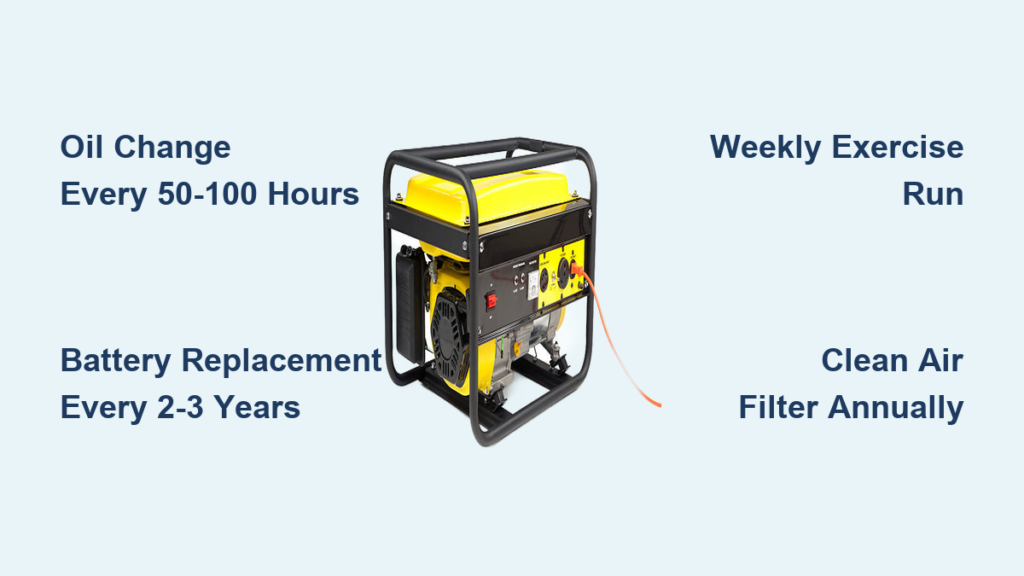
15-minute weekly routine:
– Verify oil level at full mark (not overfilled)
– Confirm fuel is fresh (less than 30 days old)
– Ensure air filter clean and properly seated
– Check all connections for tightness and corrosion
Monthly deep inspection:
– Examine spark plug condition and gap
– Clean fuel filter sediment bowl
– Inspect muffler for blockages
– Test all outlets with multimeter
Pro tip: Keep a maintenance log showing reset history. Frequent resets indicate underlying problems needing professional attention.
When to Stop Resetting and Call for Service
Critical Failure Indicators
Some reset situations signal internal component failure requiring professional repair. Continuing to reset may cause irreparable damage.
Immediate service required when:
– Generator won’t start after hard reset
– Blue smoke from exhaust during operation
– Metal shavings in oil during changes
– Repeated low oil shutdown despite proper oil level
– Electrical burning smell during use
Cost analysis: Professional service typically costs $150-400, while ECM replacement often exceeds the generator’s value. Consider warranty coverage and equipment age before major repairs.
Your Ryobi generator’s reset process varies by model and shutdown cause, but most issues resolve through the standard restart sequence when performed correctly. Keep this guide accessible—knowing the precise reset method prevents unnecessary service calls and restores power efficiently. Remember that frequent resets indicate underlying problems needing proper diagnosis, not just repeated resetting. Proper maintenance and load management reduce reset needs by up to 80%, ensuring reliable power when you need it most.